Install build dependencies:
./debian-deps.sh
Build the image:
make
This U-Boot build includes Odroid-M2 device tree from the Linux 6.18.1 kernel sources, that will be provided to the operating system booted with UEFI. The device tree is patched to enable both on-board and HDMI audio output. It likely also works with other Linux kernel versions, so you can upgrade your distribution kernels.
Write it to SD card (replace sdXX with device corresponding to the SD card):
dd if=odroid-m2-rk3588s-uboot.img of=/dev/sdXX
If you can't bother to build it and really trust me, you may instead use a pre-built image:
curl https://dot.planet.ee/dist/odroid-m2-rk3588s-uboot.img.xz | unxz > /dev/sdXX
- Download your favorite UEFI Linux installer image for aarch64 and write it to USB stick.
- Connect M.2 NVME to the board (optional).
- Connect UART (serial) console to the boards UART (this can be skipped for some newer distributions like Ubuntu 25.10, if you have display connected to HDMI).
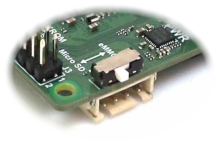
- Insert both the SD card and USB stick into your Odroid-M2. Set the boot switch to SD card.
- Power on the board to boot the installer.
- Install your Linux distribution.
- Boot the Linux distribution.
You can copy the U-Boot to the internal eMMC when Linux system has booted on the board.
Please verify before that /dev/mmcblk1 is the SD card and /dev/mmcblk0 is the 64GB eMMC on the board.
dd bs=12M count=1 if=/dev/mmcblk1 of=/dev/mmcblk0
This also copies (and overwrites) the partition table, which makes it easier to replace the u-boot later (it will be on the /dev/mmcblk0p1 which has the correct 64*512 byte offset). The original HardKernel firmware will be lost - you may want to back up it first.
If you install to the eMMC, then this copying must be done before partitioning the eMMC using the installer, or alternatively you can ensure that first ~12MiB is not partitioned and use a bit different command:
dd bs=32K count=330 if=/dev/mmcblk1p1 of=/dev/mmcblk0 seek=1
The actual u-boot is pretty small, but it consists of two parts that must be at right place on the device, with second one starting at 8MiB offset.
The UART pins counted from the nearest board corner are ground, TX, RX and +3.3V.
This means that your serial adapter pins should be connected in the order ground, RX and TX
(which often is black, green, white). The serial adapter should be configured for 1500000
baud rate, for example by using screen /dev/ttyUSB0 1500000.
The UART uses 3.3V signalling, please don't attempt connecting anything like RS232 port directly (those are specified for +/-12V signals, and would likely fry at least the SOCs UART). USB serial adapters supporting 1500000 baud rate are suitable, for example those using FT232R (FTDI), CH343, CH340 and some PL2303 variants (HX, GR, GE, GC, EA, TA).
The U-Boot 25.10 does not support HDMI output on the RK3588. The GRUB booted on it with EFI also has no HDMI output, as is with Linux kernel versions prior to 6.13. The HDMI audio output needs 6.15 kernel.
It is possible to have HDMI output on the installed Linux, provided that it uses at least 6.13 kernel compiled with CONFIG_ROCKCHIP_DW_HDMI_QP enabled and video mode (for example video=1920x1080@60) is given on kernel command line. You should use at least 6.15 kernel version, if you wish to use other video modes than 1920x1080.
You may need to install newer kernel, if your distributions default kernel is older than 6.13 (for example on the Debian you can install experimental kernel packages, or possibly use the backports, when newer kernel versions have landed there).
Usable GUI also needs userland to have 24.x or newer version of the Mesa libraries.
Currently many Linux distributions installers need UART console, however some newer ones are able to boot into working graphical GUI. NB! The display appears only after the Linux kernel has booted (GRUB has no output).
Chromium based browsers run smoothly with good performance, but they contain some bug that causes frequent crashes when using Wayland directly. Possible workarounds are setting Preferred Ozone platform #ozone-platform-hint to X11 or enabling Vulkan #enable-vulkan and Default ANGLE Vulkan #default-angle-vulkan on the chrome://flags page.
Enabling Vulkan has been tested with Mesa 25.1 and 25.2. Using ungoogled-chromium flatpak with Mesa 25.2 on Debian 13 I enabled Override software rendering list #ignore-gpu-blocklist, Vulkan #enable-vulkan, Default ANGLE Vulkan #default-angle-vulkan, Vulkan from ANGLE #vulkan-from-angle, Trees in viz #trees-in-viz and disabled Wayland linux-drm-syncobj explicit sync #wayland-linux-drm-syncobj. Vulkan on Chromium has a bug causing flickering on web pages, this can be avoided by disabling GPU rasterization #enable-gpu-rasterization.
Firefox has acceptable performance with the Linux 6.15 kernel and is annoyingly laggy on the 6.13.
There seems to be a bug that causes Linux kernel to log warnings [CRTC:80:video_port0] vblank wait timed out and if Wayland syncs with vblank, it hungs for a second or few. Workaround is to disable vblank syncing (avoiding the hickups), for example start Sway with environment variable vblank_mode=0 set and add output * allow_tearing yes into ~/.config/sway/config file.
Run the util/cpu-affinity-m2.sh script at startup for IRQ affinity and CPU scheduler tuning.
This script is inspired by Thomas Kaiser comments about Radxa Rock 5B with BSP kernel.
If you like Quake III, put seta cl_renderer "opengl1" into ~/.q3a/baseq3/q3config.cfg (replacing previous cl_renderer value) for better ioquake3 performance. It is mostly fast and flawlessly playable, although with rare hiccups.
I'm using following additional kernel parameters in the Debians /etc/default/grub file:
coherent_pool=2Mto allocate 2MB contiguous memory for DMA (should avoid some UAS problems)video=1920x1080@60sets the video mode for display connected to the HDMI (not necessary with 6.17 and later kernels, as Ubuntu 25.10 live image boots into GUI without it)drm.vblankoffdelay=50seems to makevblank wait timed outwarnings rarerconsole=ttyS2 console=tty0enables both serial and framebuffer console, with framebuffer as primary for entering LUKS password at boot