Node Leaf is a visual, node-based RAG (Retrieval-Augmented Generation) studio and prompt orchestration engine. Built in Flutter, it serves as the ultimate power-user client for the Redleaf Knowledge Engine.
Blog Post: https://nathanielwestveer.com/posts/node-leaf/
Instead of chatting with a standard text box, Node Leaf provides an infinite canvas where you can visually wire together Redleaf database queries, agent personas, and prompt instructions, and feed them directly into local LLMs via Ollama.
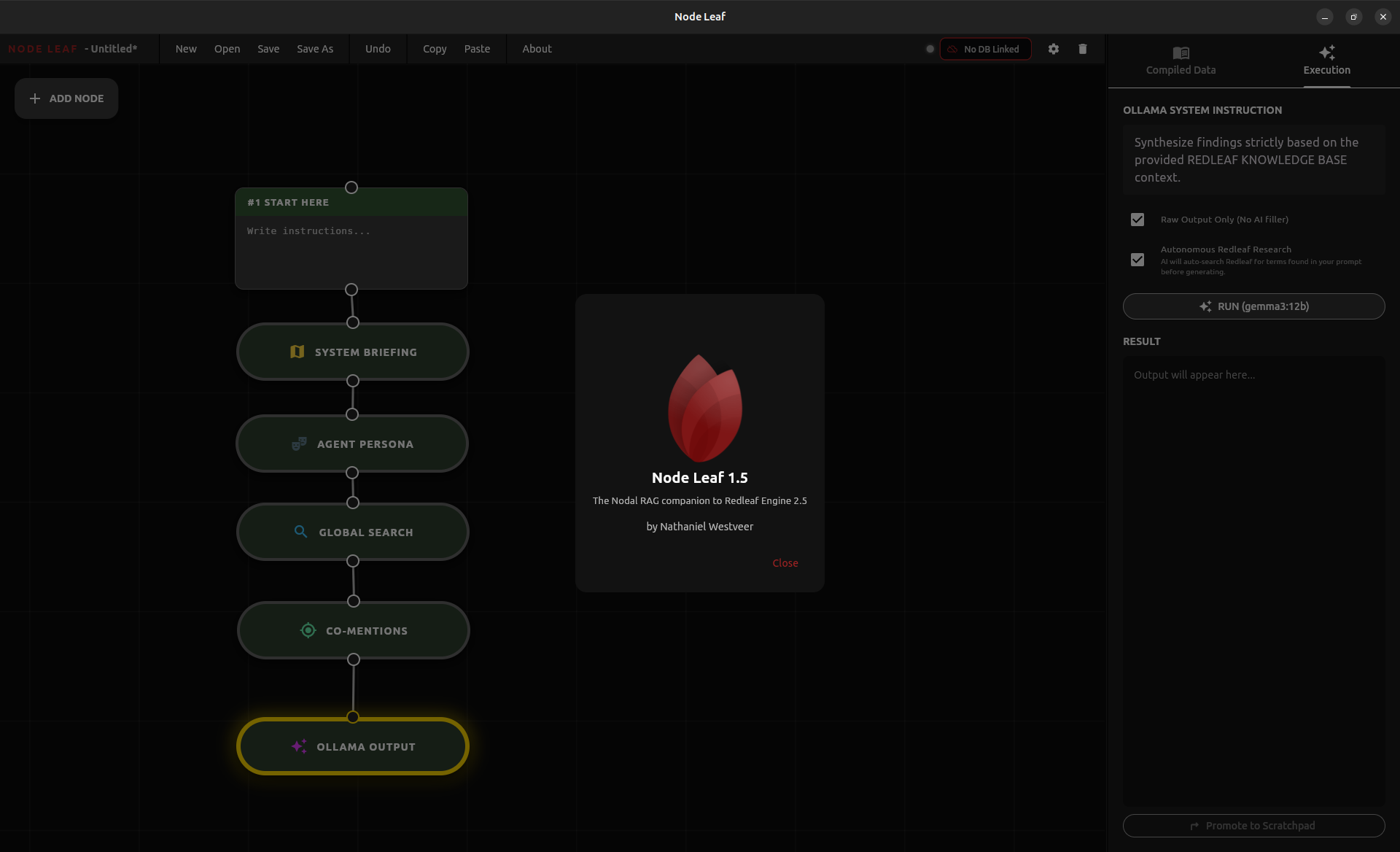
- Visual Prompt Programming: Drag, drop, and wire nodes together to build complex context chains for your LLM.
- Direct Redleaf Integration: Extract text from specific documents, search the database, or pull graph relationships without ever copy-pasting.
- Autonomous Agents: Use the Deep Study node to deploy an agent that iteratively searches your Redleaf database, reads documents, and takes notes before writing a final report.
- 100% Local & Private: Connects directly to your local Redleaf Flask server and your local Ollama instance. No cloud APIs required.
- Project Management: Save and load your node layouts as
.nlffiles to resume your research later. - Graph Canvas: Infinite panning/zooming, lasso selection, copy/paste, and undo/redo support.
Node Leaf relies on a Directed Acyclic Graph (DAG) architecture. Data flows from top to bottom, accumulating context until it reaches an output node.
- ➕ Scratchpad: Your basic text building block. Write instructions, notes, or attach Redleaf Entity Pills.
- 🎭 Agent Persona: Define the role, tone, and perspective the AI should adopt.
- 🗺️ System Briefing: Automatically injects a high-level statistical overview of your Redleaf database.
- 🔍 Global Search: Perform a full-text search across your database and feed the top snippets to the LLM.
- 📄 Document Reader: Fetch the full raw text of a specific Document ID.
- 🗂️ Catalog Reader: Extract context from an entire user-created collection.
- 🔗 Graph Relationship: Pull structured connection data (Triplets) for a specific entity from the Redleaf Knowledge Graph.
- 🎯 Co-Mention: Find specific pages where multiple entities are mentioned together.
- ✨ Ollama Output: Compiles all upstream context and generates a final written response.
- 💬 Ollama Chat: Turns your upstream context into a system prompt for a continuous, interactive chat session.
- 🤓 Deep Study (Geek Out): Enter a topic, and this autonomous agent will loop through Redleaf—searching, reading, and taking notes—until it has enough data to synthesize a master report.
- Flutter SDK (Version 3.0+)
- Redleaf running on your local machine or LAN.
- Ollama installed with your preferred models (e.g.,
gemma3:12b,llama3).
-
Clone the repository:
git clone https://github.com/nathanfx330/node_leaf.git cd node_leaf -
Install dependencies:
flutter pub get
-
Run the app (Desktop highly recommended):
flutter run -d macos # or windows, linux
When you first launch Node Leaf, click the Settings (⚙️) icon in the top right corner.
- Connect to Redleaf:
Enter your Redleaf Flask API URL (e.g.,
http://127.0.0.1:5000), along with your Redleaf admin username and password. Click "Connect & Save". - Connect to Ollama:
Enter your Ollama URL (e.g.,
http://127.0.0.1:11434).
💡 LAN Setup Tip: If Ollama is running on a different computer than Node Leaf, the host machine must run Ollama with the environment variable
OLLAMA_HOST=0.0.0.0to accept external connections.
- Delete / Backspace: Delete selected nodes
- Ctrl/Cmd + C: Copy selected node
- Ctrl/Cmd + V: Paste node
- Ctrl/Cmd + Z: Undo
- Ctrl/Cmd + S: Save Project
- Ctrl/Cmd + Shift + S: Save Project As
- Ctrl/Cmd + O: Open Project
- Shift + Click: Add to current selection
- Shift + Drag Node over Wire: Insert node into an existing connection
This project is licensed under the MIT License.
MIT License
Copyright (c) 2026 Nathaniel Westveer
Permission is hereby granted, free of charge, to any person obtaining a copy of this software and associated documentation files (the "Software"), to deal in the Software without restriction, including without limitation the rights to use, copy, modify, merge, publish, distribute, sublicense, and/or sell copies of the Software, and to permit persons to whom the Software is furnished to do so, subject to the following conditions:
The above copyright notice and this permission notice shall be included in all copies or substantial portions of the Software.
THE SOFTWARE IS PROVIDED "AS IS", WITHOUT WARRANTY OF ANY KIND, EXPRESS OR IMPLIED, INCLUDING BUT NOT LIMITED TO THE WARRANTIES OF MERCHANTABILITY, FITNESS FOR A PARTICULAR PURPOSE AND NONINFRINGEMENT. IN NO EVENT SHALL THE AUTHORS OR COPYRIGHT HOLDERS BE LIABLE FOR ANY CLAIM, DAMAGES OR OTHER LIABILITY, WHETHER IN AN ACTION OF CONTRACT, TORT OR OTHERWISE, ARISING FROM, OUT OF OR IN CONNECTION WITH THE SOFTWARE OR THE USE OR OTHER DEALINGS IN THE SOFTWARE.