Yida AI Skills — Give your AI agent full Yida (宜搭) platform development capabilities


A set of AI Skills designed for the DingTalk Yida (宜搭) low-code platform. Works with OpenClaw or Claude Code to let your AI agent handle the complete Yida app development lifecycle end-to-end — from login, app creation, form design, custom page development, to publishing.
- 🔐 Conversational Login — Cookie-based session persistence + interactive QR code scan via OpenClaw browser tool
- 📱 App Creation — Create a Yida app with a single sentence
- 📝 Form Development — Supports 19 field types, full CRUD operations
- ⚛️ Custom Pages — React 16 JSX development with 27 JS APIs
- 🚀 One-click Publish — Babel compile + Schema deployment
- 🔄 Full Workflow — End-to-end automation from requirements to production
| Skill | Name | Description |
|---|---|---|
yida-login |
Login | Conversational login via OpenClaw browser tool — checks local Cookie cache first, then opens DingTalk QR scan page and guides user through org selection |
yida-logout |
Logout | Clears local Cookie cache to invalidate session |
yida-create-app |
Create App | Calls registerApp API to create a Yida application |
yida-create-page |
Create Custom Page | Calls saveFormSchemaInfo API to create a custom display page |
yida-create-form-page |
Create Form Page | Creates or updates form pages with 19 field types |
yida-custom-page |
Custom Page Dev | React 16 JSX coding spec, 27 Yida JS APIs, compile & deploy |
yida-publish-page |
Publish Page | Babel compile + UglifyJS minify + Schema deploy to Yida |
yida-app |
Full App Dev | Orchestration skill: end-to-end workflow from zero to production |
yida-get-schema |
Get Schema | Calls getFormSchema API to retrieve full form Schema structure |
Visit ClawHub — Yida Skills and click Install to use all Yida skills directly in OpenClaw — no manual cloning required.
# Clone the repo (with Skills submodule)
git clone --recurse-submodules https://github.com/openyida/openyida.git

# Open the project in your editor and start OpenClaw / Claude Code
# Generate an app in one sentence: "Build me a birthday greeting mini-game app"
# Generate from a requirements doc: "Build a personal salary calculator app"

# Already cloned without submodules? Run:
# git submodule update --init --recursiveproject-root/
├── README.md # Required — used to detect root path
├── config.json # Global config (loginUrl, defaultBaseUrl)
├── .cache/
│ └── cookies.json # Session cache (auto-generated at runtime, gitignored)
├── pages/src/
│ └── <page-name>.js # Custom page source code
├── pages/dist/
│ └── <page-name>.js # Compiled output
├── prd/
│ └── <page-name>.md # Requirements doc (with all config info)
└── skills/ # Skill directories
openyida-openclaw-skill/
├── skills/
│   ├── shared/                    # Shared utilities (fetch-with-retry, i18n)
│   ├── yida-login/
│   │   ├── SKILL.md
│   │   └── scripts/
│   │       ├── check-login.py     # Lightweight Cookie check (no browser)
│   │       └── login-interactive.py  # Interactive login helper
│   ├── yida-logout/
│   │   └── SKILL.md
│   ├── yida-create-app/
│   │   └── scripts/
│   │       └── create-app.js
│   ├── yida-create-page/
│   │   └── scripts/
│   │       └── create-page.js
│   ├── yida-create-form-page/
│   │   └── scripts/
│   │       └── create-form-page.js
│   ├── yida-custom-page/
│   │   └── SKILL.md               # JSX dev spec + 27 JS APIs reference
│   ├── yida-publish-page/
│   │   └── scripts/
│   │       ├── publish.js
│   │       └── babel-transform/
│   ├── yida-get-schema/
│   │   └── scripts/
│   │       └── get-schema.js
│   └── yida-app/
│       └── SKILL.md               # Orchestration skill (no scripts)
├── config.json
├── .github/
│   └── workflows/
├── README.md
└── LICENSE
| Dependency | Version | Purpose |
|---|---|---|
| Node.js | ≥ 16 | yida-publish-page, yida-create-* scripts |
| Python | ≥ 3.8 | yida-login Cookie check scripts |
| OpenClaw | latest | Browser tool for interactive QR login |
Q: Script error "node_modules not found"?
Install dependencies first:
npm install --prefix skills/yida-publish-page/scripts
Q: How to debug compile errors?
Error output includes exact line and column numbers.
Q: Cookie expired / login failed?
Run
yida-loginskill — the AI will open the DingTalk QR page via browser tool and guide you through re-login.
一套专为 钉钉宜搭 低代码平台设计的 AI Skills,覆盖从登录、建应用、建表单、开发自定义页面到发布的完整研发链路。配合 OpenClaw 或 Claude Code 使用,让 AI 真正能帮你端到端地完成宜搭应用开发。
- 🔐 对话式登录 — Cookie 持久化 + 通过 OpenClaw browser 工具交互式扫码登录
- 📱 应用创建 — 一句话创建宜搭应用
- 📝 表单开发 — 支持 19 种字段类型,CRUD 操作
- ⚛️ 自定义页面 — React 16 JSX 开发,27 个 JS API
- 🚀 一键发布 — Babel 编译 + Schema 部署
- 🔄 完整工作流 — 从需求到发布,端到端自动化
| 技能名称 | 中文名 | 功能描述 |
|---|---|---|
yida-login |
登录管理 | 对话式登录:先检查本地 Cookie 缓存,无效时通过 OpenClaw 浏览器工具打开钉钉扫码页面,引导用户扫码选择组织完成登录 |
yida-logout |
退出登录 | 清空本地 Cookie 缓存,使登录态失效 |
yida-create-app |
创建应用 | 调用 registerApp 接口快速创建宜搭应用 |
yida-create-page |
创建自定义页面 | 调用 saveFormSchemaInfo 接口创建自定义展示页面 |
yida-create-form-page |
创建/更新表单页面 | 支持 19 种字段类型的表单创建与更新(含流水号字段) |
yida-custom-page |
自定义页面开发 | React 16 JSX 开发规范、27 个宜搭 JS API、编译与部署 |
yida-publish-page |
发布页面 | Babel 编译 + UglifyJS 压缩 + Schema 部署到宜搭平台 |
yida-app |
完整应用开发 | 编排型技能:从零到一搭建完整宜搭应用的全流程(无独立脚本) |
yida-get-schema |
获取表单结构 | 调用 getFormSchema 接口获取表单完整结构数据 |
访问 ClawHub 宜搭技能页,点击安装即可在 OpenClaw 中直接使用所有宜搭技能,无需手动克隆仓库。
# 克隆仓库(含 Skills 子模块)
git clone --recurse-submodules https://github.com/openyida/openyida.git

# 使用代码编辑器打开项目,打开 OpenClaw 或 Claude Code
# 一句话生成应用:帮我搭建一个生日祝福小游戏应用
# 根据需求文档生成应用:帮我搭建个人薪资计算器应用

# 已克隆但未带子模块?执行以下命令补充初始化:
# git submodule update --init --recursive项目根目录/
├── README.md # 用来判断根目录路径,必须存在
├── config.json # 全局配置(loginUrl、defaultBaseUrl)
├── .cache/
│ └── cookies.json # 登录态缓存(运行时自动生成,已加入 .gitignore)
├── pages/src/
│ └── <项目名>.js # 自定义页面源码
├── pages/dist/
│ └── <项目名>.js # 自定义页面编译后的代码
├── prd/
│ └── <项目名>.md # 需求文档(含所有配置信息)
└── skills/ # 各子技能目录
openyida-openclaw-skill/
├── skills/
│   ├── shared/                    # 共享工具模块(网络请求重试、国际化)
│   ├── yida-login/
│   │   ├── SKILL.md
│   │   └── scripts/
│   │       ├── check-login.py     # 轻量 Cookie 检查(不启动浏览器)
│   │       └── login-interactive.py  # 交互式登录辅助脚本
│   ├── yida-logout/
│   │   └── SKILL.md
│   ├── yida-create-app/
│   │   └── scripts/
│   │       └── create-app.js      # 创建应用脚本
│   ├── yida-create-page/
│   │   └── scripts/
│   │       └── create-page.js     # 创建自定义页面脚本
│   ├── yida-create-form-page/
│   │   └── scripts/
│   │       └── create-form-page.js  # 创建表单页面脚本
│   ├── yida-custom-page/
│   │   └── SKILL.md               # JSX 开发规范 + 27 个 JS API 参考
│   ├── yida-publish-page/
│   │   └── scripts/
│   │       ├── publish.js         # 发布脚本
│   │       └── babel-transform/   # Babel 编译配置
│   ├── yida-get-schema/
│   │   └── scripts/
│   │       └── get-schema.js      # 获取表单结构脚本
│   └── yida-app/
│       └── SKILL.md               # 编排型技能(无独立脚本)
├── config.json
├── .github/
│   └── workflows/                 # CI 配置
├── README.md
└── LICENSE
| 依赖 | 版本要求 | 用途 |
|---|---|---|
| Node.js | ≥ 16 | yida-publish-page、yida-create-* 系列脚本 |
| Python | ≥ 3.8 | yida-login Cookie 检查脚本 |
| OpenClaw | 最新版 | 浏览器工具,用于交互式扫码登录 |
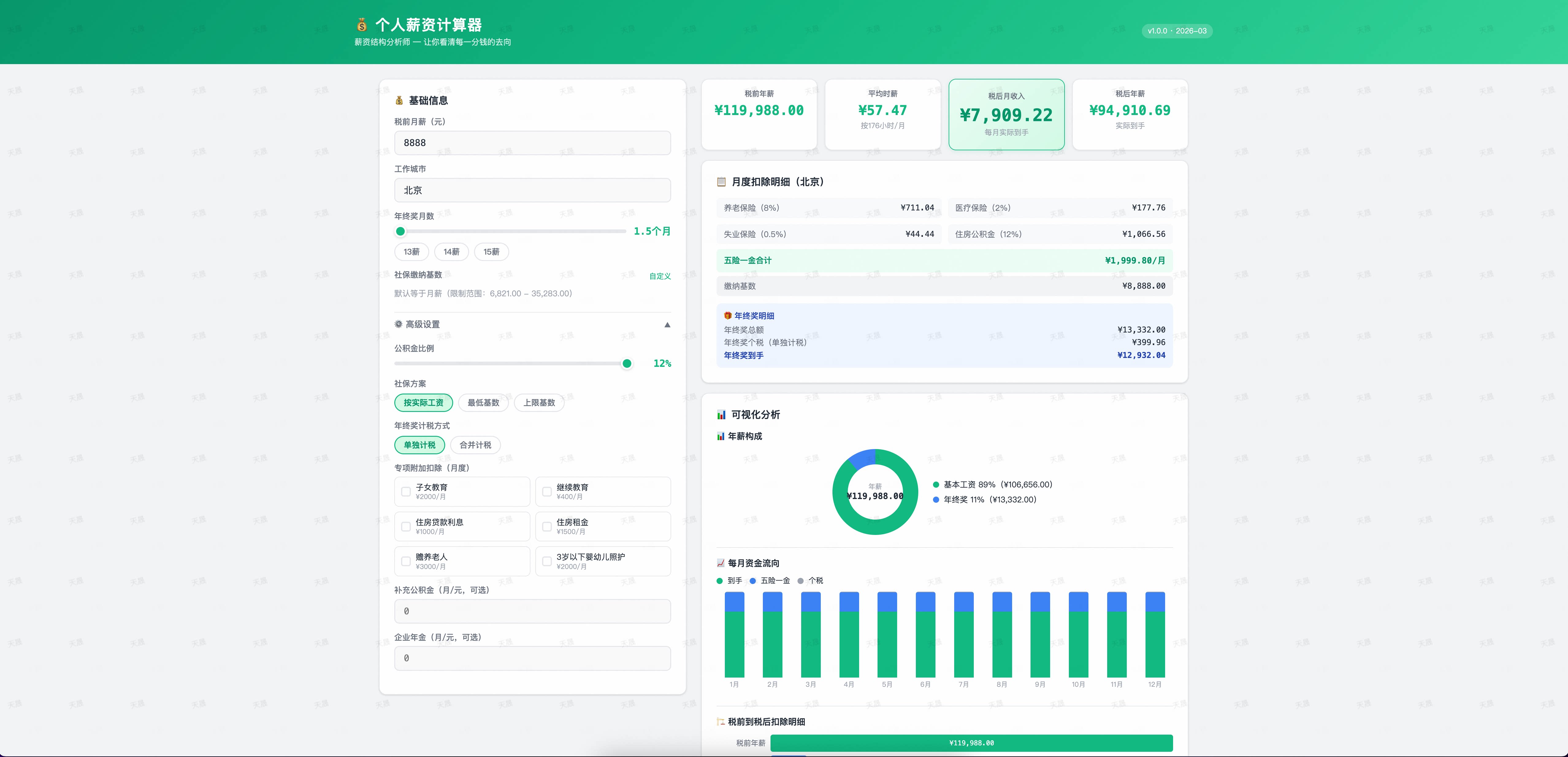
企业级产品介绍页,一句话生成完整落地页。

AI 生成灯谜图片,用户猜答案,猜错了有 AI 幽默提示。

Q: 运行脚本报错 "node_modules not found"?
需要先安装依赖:
npm install --prefix skills/yida-publish-page/scripts
Q: 编译报错如何排查?
错误信息会显示具体行号和列号。
Q: Cookie 失效 / 登录失败怎么办?
调用
yida-login技能,AI 会通过浏览器工具打开钉钉扫码页面,引导你重新登录。
欢迎提交 PR!请确保 CI 检查通过。
# 本地语法检查
node --check skills/*/scripts/*.js感谢所有参与贡献的开发者:


MIT © 2026 Alibaba Group
- Anthropic — Claude & Skills 规范
- 阿里巴巴 Low Code Engine — 企业级低代码技术体系(15.8k⭐)
- 钉钉宜搭 — 低代码平台
- OpenClaw — AI Agent 工具平台