Win your next presentation with AI-powered body language feedback.
Coherence is an AI platform that detects visual-verbal dissonance — when your body language contradicts what you're saying. Built for students, professionals, and anyone who wants to present with confidence.
YouTube Demo:
- 75% of people fear public speaking more than death
- 90% of presentation anxiety stems from lack of objective feedback
- Existing tools (Yoodli, PowerPoint Coach) only analyze audio
- 55% of communication is non-verbal, yet no tool catches body language mistakes
❌ Emotional Mismatch - Saying "I'm thrilled" with an anxious face ❌ Missing Gestures - Saying "look at this chart" without pointing ❌ Pacing Issues - Showing dense slides too briefly for comprehension
- Yoodli (primary competitor) – 100k+ professionals, powered by Google Cloud, with:
- Real-time speech coaching during live calls
- Filler word detection and pacing analysis
- Body language scoring (added in 2024)
- Integrations with Zoom, Google Meet, and Teams
- Strong adoption via Toastmasters (300k+ members)
- Orai – Mobile-focused speech coach (filler words, pacing, conciseness)
- Poised – Real-time feedback during meetings with privacy focus
- Verble – AI speech-writing assistant for persuasion and storytelling
Most tools (including Yoodli) track body language metrics and audio metrics separately. Coherence focuses on visual-verbal dissonance – the misalignment between what you say and how you appear:
- Saying “I’m excited” with flat or anxious affect (emotional mismatch)
- Saying “look at this chart” without pointing (missing gesture)
- Rushing through dense content (pacing mismatch) where slide density and speaking speed don’t match
Instead of just counting “% eye contact” or “number of gestures”, Coherence detects contradictions that undermine credibility and trust.
- Yoodli’s positioning: “Grammarly for speech” – real-time meeting coach for everyday communication.
- Coherence’s positioning: “Authenticity coach” – deep post-analysis of how well your message and delivery align.
Yoodli focus: Live calls, meeting integrations, real-time tips. Coherence focus: Prepared presentations, recorded pitches, interviews, and keynotes with:
- Semantic context matching between transcript and visual behavior
- Timestamped coaching linked to specific moments of dissonance
- Emphasis on authenticity and trust, not just mechanical technique
- Global speech/presentation coaching market: ~$2.8B (2024), ~7–7.2% CAGR to 2032
- Subscription-based models growing ~28% annually
- Online platforms already account for ~42% of all coaching sessions
- ~30% of AI models by 2026 are expected to use multimodal learning (voice + visual + behavioral)
Coherence is aligned with this macro trend toward multimodal coaching and can sustain a subscription price point (e.g. $19–49/month), especially for professionals and education partners.
┌─────────────────┐
│   Vite + React  │  ← Frontend (TypeScript + TailwindCSS)
│   (Mobile-First)│
└────────┬────────┘
         │ REST API
┌────────▼────────┐
│    FastAPI      │  ← Backend (Python, async)
│   PostgreSQL    │  ← Database
│   Redis/Celery  │  ← Background Jobs
└────────┬────────┘
         │ AI Services
    ┌────┼─────────────────┐
    ▼    ▼                 ▼
┌───────┐ ┌──────────┐ ┌─────────┐
│Video  │ │ Speech   │ │Coaching │
│Analysis│ │Transcribe│ │Synthesis│
└───────┘ └──────────┘ └─────────┘
Frontend
- Vite 6+ with React 18 - Build tool and UI framework
- TypeScript - Type safety
- TailwindCSS v4 - Mobile-first responsive design
- shadcn/ui - Pre-built Radix UI components
- Lucide React - Icon system
- Progressive Web App (PWA) - Mobile app-like experience
Backend
- FastAPI - Python async web framework
- Supabase - PostgreSQL database + Authentication + Storage + Realtime
- Celery + Redis (Upstash) - Background job processing
- Google Cloud Run - Production deployment
- Pydantic - Request/response validation
AI Services (Flexible - Evaluate Best Options)
- Video Analysis: TwelveLabs (current) or alternatives (OpenAI Vision, custom models)
- Speech Transcription: Deepgram (current) or alternatives (Whisper, AssemblyAI)
- Coaching Synthesis: Gemini (current) or alternatives (Claude, GPT-4)
Note: AI services are evaluated based on cost, accuracy, and features. The architecture supports swapping providers without changing business logic.
Our AI pipeline analyzes video in parallel:
- Video Analysis: Eye contact, fidgeting, gestures, facial expressions
- Speech Analysis: Transcription, filler words ("um", "uh", "like"), speaking pace
- Coaching Synthesis: Natural language coaching advice
| Type | Description | Example |
|---|---|---|
EMOTIONAL_MISMATCH |
Positive words with anxious/flat expression | Saying "thrilled" while frowning |
MISSING_GESTURE |
Deictic phrases without pointing | "Look at this" without gesturing |
PACING_MISMATCH |
Speaking too fast/slow for content | Rushing through dense material |
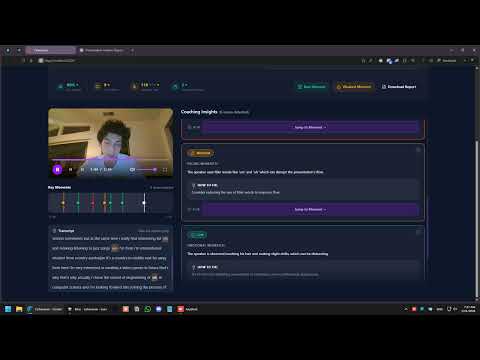
- Video Player with custom controls and seek functionality
- Dissonance Timeline - Click severity markers to jump to timestamps
- Coaching Cards - Dismissible insights with "Jump to Moment" buttons
- Transcript Panel - Word-level transcript with filler word highlighting
- Coaching Summary - Natural language AI coaching advice
Weighted algorithm:
- Eye contact percentage: 30%
- Filler word count: 25% (fewer = better)
- Fidgeting frequency: 20% (fewer = better)
- Speaking pace: 15% (140-160 WPM optimal)
- Dissonance penalties: -10 per HIGH, -5 per MEDIUM severity flag
Score Tiers:
- 76-100: "Strong"
- 51-75: "Good Start"
- 0-50: "Needs Work"
- Responsive layout for all screen sizes
- Camera integration for mobile recording
- Touch-optimized interactions
- Progressive Web App (PWA) support
| Endpoint | Method | Description | Auth Required |
|---|---|---|---|
GET /api/auth/me |
GET | Get current authenticated user info | Yes |
POST /api/videos/upload |
POST | Upload video (MP4/MOV/WebM, max 500MB) | Yes |
GET /api/videos/{id}/status |
GET | Poll processing status (0-100%) | Yes |
GET /api/videos/{id}/results |
GET | Fetch complete analysis results | Yes |
GET /api/videos/{id}/stream |
GET | Stream video file for playback | Yes |
GET /api/users/me/videos |
GET | List user's videos | Yes |
GET /health |
GET | Health check endpoint | No |
Note: Authentication is handled by Supabase. Frontend uses Supabase JS SDK for login/register. Backend verifies JWT tokens from Authorization: Bearer <token> header.
{
  "videoId": "abc-123",
  "videoUrl": "/api/videos/abc-123/stream",
  "durationSeconds": 183.0,
  "coherenceScore": 67,
  "scoreTier": "Good Start",
  "metrics": {
    "eyeContact": 62,
    "fillerWords": 12,
    "fidgeting": 8,
    "speakingPace": 156,
    "speakingPaceTarget": "140-160"
  },
  "dissonanceFlags": [
    {
      "id": "flag-1",
      "timestamp": 45.2,
      "endTimestamp": 48.0,
      "type": "EMOTIONAL_MISMATCH",
      "severity": "HIGH",
      "description": "Said 'thrilled to present' but facial expression showed anxiety",
      "coaching": "Practice saying this line while smiling in a mirror.",
      "visualEvidence": "Detected 'anxious face' at 0:43-0:48",
      "verbalEvidence": "'thrilled' (positive sentiment)"
    }
  ],
  "transcript": [
    {
      "text": "Hello everyone, today I'm thrilled...",
      "start": 0.5,
      "end": 3.2
    }
  ],
  "coachingReport": {
    "headline": "Solid foundation to build on",
    "advice": "Great job on your presentation! You did a wonderful job maintaining eye contact..."
  }
}- Node.js 18+
- Python 3.10+
- Supabase account (free tier works for development)
- Redis (Upstash free tier or local Redis)
- API keys for AI services (TwelveLabs, Deepgram, Gemini - or alternatives)
# From repository root
npm install
npm run dev
# Opens at http://localhost:3000# From repository root
python -m venv venv
.\venv\Scripts\Activate.ps1 # Windows PowerShell
# or: source venv/bin/activate # Linux/Mac
pip install -r requirements.txt
# Create .env file in repository root with:
# SUPABASE_URL=https://xxx.supabase.co
# SUPABASE_KEY=your_service_role_key
# REDIS_URL=redis://localhost:6379 (or Upstash URL)
# TWELVELABS_API_KEY=your_key (or alternative)
# DEEPGRAM_API_KEY=your_key (or alternative)
# GEMINI_API_KEY=your_key (or alternative)
# Run backend server
uvicorn backend.app.main:app --reload --host 0.0.0.0 --port 8000
# Run background worker (separate terminal)
celery -A backend.app.tasks.celery_app worker --loglevel=info# Supabase (Database + Auth + Storage)
SUPABASE_URL=https://xxx.supabase.co
SUPABASE_KEY=your_service_role_key # Service role key for backend
# Redis (for Celery background jobs)
REDIS_URL=redis://localhost:6379 # or Upstash URL
# AI Services (flexible - use alternatives if preferred)
TWELVELABS_API_KEY=your_twelvelabs_key
DEEPGRAM_API_KEY=your_deepgram_key
GEMINI_API_KEY=your_gemini_key
# Optional: Service selection
VIDEO_ANALYSIS_PROVIDER=twelvelabs # or openai, custom
SPEECH_PROVIDER=deepgram # or whisper, assemblyai
COACHING_PROVIDER=gemini # or claude, gpt4Frontend Environment Variables (for Vite):
VITE_SUPABASE_URL=https://xxx.supabase.co
VITE_SUPABASE_ANON_KEY=your_anon_key  # Public anon key for frontend
VITE_API_URL=http://localhost:8000 # Backend API URLcoherence/
├── index.html # Vite entry point
├── package.json # Frontend dependencies
├── requirements.txt # Python dependencies
├── vite.config.ts # Vite configuration
├── tsconfig.json # TypeScript configuration
│
├── frontend/ # React frontend
│ ├── main.tsx # Entry point
│ ├── App.tsx # Root component with routing
│ ├── components/
│ │ ├── ui/ # shadcn/ui components
│ │ ├── auth/ # Authentication components
│ │ ├── upload/ # Upload page components
│ │ ├── results/ # Results dashboard components
│ │ ├── profile/ # User profile components
│ │ └── mobile/ # Mobile-specific components
│ ├── lib/
│ │ ├── api.ts # API service layer
│ │ ├── auth.ts # Authentication utilities
│ │ └── hooks/ # Custom React hooks
│ └── types/
│ └── api.ts # TypeScript API types
│
├── backend/
│ ├── app/
│ │ ├── main.py # FastAPI app + CORS + startup logging
│ │ ├── config.py # Configuration (Supabase keys, AI services)
│ │ ├── dependencies.py # Supabase client, auth dependencies
│ │ ├── routers/
│ │ │ ├── auth.py # Authentication endpoints
│ │ │ └── videos.py # Video endpoints
│ │ ├── services/
│ │ │ ├── video_service.py # Video processing
│ │ │ ├── storage_service.py # Supabase Storage
│ │ │ └── ai/ # AI service abstraction
│ │ ├── models/
│ │ │ └── schemas.py # Pydantic schemas
│ │ ├── middleware/
│ │ │ └── error_handler.py # Error handling
│ │ └── tasks/
│ │ └── video_processing.py # Celery background jobs
│ ├── tests/ # Test suite
│ └── cli.py # CLI testing tool
│
├── documentation/
│ ├── ROADMAP.md # Development phases
│ └── FIGMA_GUIDELINES.md # Frontend spec
├── AGENTS.md # AI assistant guidelines
├── CLAUDE.md # Backend guidelines
└── README.md
Upload Video ─┬─► Speech Analysis (5-10s)    ─┬─► Merge Results ─► Coaching Report ─► Store
              │   └─► Transcript              │   └─► Score Calculation
              │   └─► Filler words            │
              │   └─► Speaking pace           │
              │                               │
              └─► Video Analysis (20-40s)     ─┘
                  └─► Video indexing
                  └─► Visual analysis
                  └─► Dissonance flags
Processing Time: ~30-45 seconds for 2-minute video (target: <30s)
Coherence is designed to be a private, judgment-free coach. Key principles:
- Explicit user consent before any video is analyzed
- Clear, human-readable privacy policy describing:
- What is collected (video, audio, derived metrics)
- How it is processed and for what purpose
- Users can delete videos and analysis results permanently
- No sharing of user data with third parties without explicit consent
- Explain what AI analyzes (visual + verbal + timing) and what it does not do
- Communicate limitations of the system; this is coaching, not therapy or clinical assessment
- Where appropriate, surface confidence indicators (e.g. low/medium/high confidence on certain detections)
- Encrypted storage for videos and analysis data (e.g. S3/GCS with encryption at rest)
- Secure streaming with signed URLs or authenticated proxy endpoints
- Path toward SOC 2 and GDPR compliance as the product matures
- Test across diverse speakers (ethnicity, gender, age, accent) during development and beta
- Avoid training or depending on datasets with known bias in facial expression recognition
- Provide context that body language varies by culture and emphasize suggestive, not prescriptive, feedback
See ROADMAP.md for detailed development phases:
- Phase 1: Foundation & Infrastructure (Auth, Database, Storage)
- Phase 2: User Experience & Mobile (Mobile-first design, UX improvements)
- Phase 3: Advanced Features (Enhanced AI, personalized coaching)
- Phase 4: Scale & Optimization (Performance, scalability)
- Phase 5: Launch Preparation (Deployment, billing, go-to-market)
✅ Completed (Hackathon MVP):
- Core video analysis pipeline
- Visual-verbal dissonance detection
- Interactive results dashboard
- Basic API endpoints
🚧 In Progress (Production):
- Supabase integration (Auth + Database + Storage)
- Background job system (Celery + Redis)
- Mobile-first responsive design
- Google Cloud Run deployment
⏳ Planned:
- Advanced AI features
- Team/group features
- Integration with presentation tools
- Production deployment
- Roadmap - Development phases and milestones
- Frontend Guidelines - Frontend generation spec and mobile-first design
- Backend Guidelines - Backend development and API contracts
- Agent Guidelines - AI assistant integration patterns
- Backend README - Backend module documentation
This is a production startup project. For contributions, please:
- Check the current phase in ROADMAP.md
- Follow code quality standards in CLAUDE.md and AGENTS.md
- Write tests for new features
- Update documentation as needed
- AI Service Providers - Video understanding, speech transcription, and coaching synthesis
- Open Source Community - Vite, React, FastAPI, and all other open-source tools
- Early Users - Feedback and support during development
Built with ❤️ | Making confident presentation skills accessible to everyone