A lightweight compose-like dev workflow tool for services and tasks.
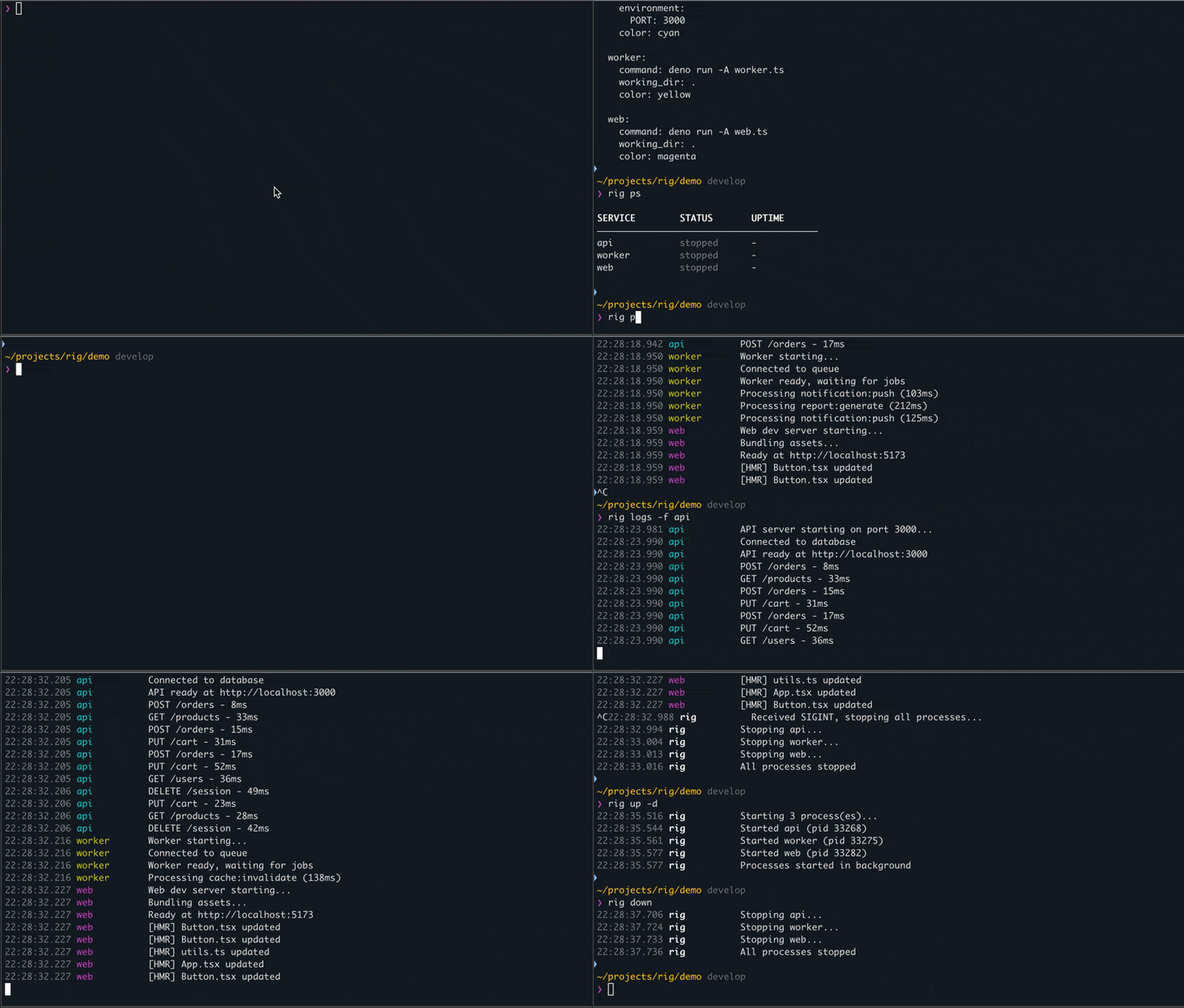
Services - long-running processes via tmux:
rig up        # Start all services, stream logs (Ctrl+C stops all)
rig up -d     # Start in background (detached)
rig down      # Stop all services (graceful)
rig ps        # Show status
rig logs -f   # Follow logs
Tasks - one-off commands:
rig tasks                           # List all tasks
rig run backend.build               # Run a group-level task
rig run backend.api.test            # Run a service-level task
rig run backend.api.test -- --ci    # Pass args to task via --
rig run api.test web.test db.test   # Run multiple tasks sequentially
rig run api.test web.test -p        # Run tasks in parallel
Services run in tmux sessions - they survive terminal close and can be reattached. Tasks execute directly - they pass through stdin/stdout and exit codes.
Smoother dev workflow when working with many services, apps, and commands - without having to delegate everything to docker.
- Simple config - one yaml or multiple that compose via imports
- No state, no runtime - tmux is the source of truth, no daemon running
- Survives terminal close - tmux keeps services running, come back anytime
- Optional file watching - services auto-restart when code changes
- Supports monorepo workflows - run from any subdirectory, configs compose via imports
- Runs anything - npm, deno, cargo, docker, scripts - doesn't matter
- Greppable file logs - logs persist to disk, easy to search for you or agents
- Quick inspection - see resource usage and ports at a glance
- Fast project switching - spin up/down entire setups when switching between projects
- Deploy-aligned env vars - in config or external files, no dotenv in code, same pattern as production
Install or upgrade (macOS, Linux):
curl -fsSL https://raw.githubusercontent.com/roelentless/rig/develop/install.sh | shDownloads a prebuilt binary from GitHub Releases. Checks prerequisites, shows the plan, asks before running. Safe to re-run for upgrades.
The installer will offer to install watchexec (optional, for file watching). To include it non-interactively:
curl -fsSL https://raw.githubusercontent.com/roelentless/rig/develop/install.sh | sh -s -- --with-watchexecPrerequisites: tmux (required), watchexec (optional, for file watching)
# macOS
brew install tmux watchexec

# Linux (Debian/Ubuntu)
sudo apt install tmux

# Linux (Fedora)
sudo dnf install tmux

# Linux (Arch)
sudo pacman -S tmux

# watchexec (all Linux distros, optional)
curl https://webi.sh/watchexec | sh
Download the binary from GitHub Releases and place it in your PATH:
# Example for Linux amd64:
curl -fsSL https://github.com/roelentless/rig/releases/latest/download/rig-linux-amd64.tar.gz | tar xz
mv rig ~/.local/bin/

# Example for macOS arm64:
curl -fsSL https://github.com/roelentless/rig/releases/latest/download/rig-macos-arm64.tar.gz | tar xz
mv rig /usr/local/bin/Create rig.yaml somewhere:
groups:
  backend:
    services:
      db:
        command: docker run --rm -p 5432:5432 postgres:16
        working_dir: .
        healthcheck:
          grace_ms: 1000

      api:
        command: deno run -A server.ts
        working_dir: ./backend
        environment:
          PORT: 3000
        depends_on: [db]
        tasks:                           # Service-level tasks
          test:
            command: deno test -A
          build:
            command: deno compile -A -o dist/api server.ts
            description: Compile to binary

    tasks:                               # Group-level tasks
      deploy:
        command: ./scripts/deploy.sh
        working_dir: .
        description: Deploy backend

  frontend:
    services:
      web:
        command: npm run dev
        working_dir: ./frontend
See example/ for a working config with all features, and example/cli-log.md for real command output.
rig - lightweight dev workflow tool for services and tasks

USAGE:
  rig <command> [options] [services...]

SERVICES:
  init                      Create rig.yaml in current directory
  start/up [services...]    Start processes (foreground, streaming logs)
  start/up -d [services...] Start processes in background (detached)
  stop/down [services...]   Stop processes (graceful)
  kill [services...]        Force kill with SIGKILL
  restart [services...]     Restart processes
  ps/list [-f|--full]       Show status (add -f for mem/cpu/ports)
  top                       Live dashboard with auto-refreshing metrics
  logs/tail [-f] [--prev] [service]  Show logs (--prev for last run)
  config [--raw|--json] [services...] Show config (--raw for YAML, --json for JSON)

TASKS:
  tasks [--group <name>]           List all tasks
  run/task <task...> [-- args...]  Run task(s) (group.name or group.service.name)
    -p, --parallel                 Run tasks in parallel

MULTI-FILE:
  discover [--dry-run] [--yes] [path]  Scan for rig files and update imports

OTHER:
  version                   Show version
  help                      Show this help

OPTIONS:
  -g, --group <name>        Target entire group(s) instead of services
  -v, --verbose             Enable verbose logging for debugging

EXAMPLES:
  rig up                    Start all processes (all groups)
  rig up -d                 Start all in background
  rig start api worker      Start specific services
  rig start -g backend      Start all services in backend group
  rig down                  Stop all processes (graceful)
  rig stop -g backend       Stop all services in backend group
  rig kill                  Force kill all processes
  rig restart -g backend    Restart entire group
  rig ps                    Show status
  rig logs -f               Follow all logs
  rig logs --prev api       Show previous logs for api
  rig tasks                 List all tasks
  rig run backend.deploy    Run a task
  rig run backend.api.test -- --coverage  Pass args to task
  rig run api.test web.test Run multiple tasks sequentially
  rig run api.test web.test -p  Run tasks in parallel
  rig config --json         Show raw JSON config
  rig discover              Scan for rig files and update imports

CONFIG:
  Searches upward from current directory for rig.yaml, rig.yml, or *.rig.yaml.
  Supports imports to compose configs from multiple files.
groups:
  backend:                         # Group name (alphanumeric, hyphens, underscores)
    services:
      api:
        command: deno run -A app.ts  # Required. Command to run
        working_dir: ./backend       # Required. Working directory
        environment:                 # Optional. Environment variables
          PORT: 3000
          DEBUG: true
        env_file: ./api.env          # Optional. Load env from file
        color: cyan                  # Optional. Log color
        depends_on: [db, cache]      # Optional. Start after these services
        healthcheck:                 # Optional. Health check settings
          grace_ms: 500              # Wait before starting dependents
        requirements:                # Optional. Pre-start checks
          - check: pg_isready        # Command to test (exit 0 = met)
            command: docker start pg # Remediation if check fails
        tasks:                       # Optional. Service-level tasks
          test:
            command: deno test -A
Service names must be unique across all groups.
Tasks can be defined at the group level or service level:
groups:
  backend:
    services:
      api:
        # ... service config ...
        tasks:                       # Service-level: inherits service env/working_dir
          test:
            command: deno test -A
          build:
            command: deno compile -A -o dist/api server.ts
            environment:             # Optional: overrides/extends service env
              NODE_ENV: production
            description: Compile API

    tasks:                           # Group-level: standalone
      deploy:
        command: ./scripts/deploy.sh
        working_dir: .               # Required for group tasks
description: Deploy backend- Service tasks inherit
working_dirandenvironmentfrom their parent service - Group tasks must specify
working_dir(no parent to inherit from) - Tasks execute directly (not via tmux) - stdin/stdout pass through
- Exit codes propagate -
rig run backend.build && rig run backend.deploy
Load environment variables from external files. Supports string or array format:
# Simple form
env_file: ./app.env

# Array form with required flag
env_file:
  - path: ./default.env
    required: true   # default - error if missing
  - path: ./override.env
    required: false  # skip if missing
Files are processed in order. Later files override earlier. Inline environment values override env_file values.
The env_file path is relative to the config file location. Values inside the env file that contain relative paths will resolve relative to working_dir at runtime (where the service executes).
Great for keeping development .env files outside of your repo - reduces secret sharing with LLM agents in common workflows.
Available colors: cyan, yellow, magenta, green, blue, orange, red, lavender, pink, teal, lime, coral, sky, gold, violet
Services can automatically restart when files change using watchexec:
groups:
  docs:
    services:
      mkdocs:
        command: mkdocs serve
        working_dir: ./docs
        watch:
          paths: ['./docs', './mkdocs.yml']  # Directories to watch (relative to working_dir)
          extensions: [md, yml, yaml]        # File extensions to watch
          patterns: ['**/*.md']              # Include glob patterns
          ignore: ['**/site/**']             # Exclude patterns
          debounce: 500ms                    # Wait before restarting
All options map directly to watchexec flags - no remapping or rig-specific defaults. If paths is omitted, watchexec watches the service's working_dir by default.
| Option | Type | watchexec flag | Description |
|---|---|---|---|
paths |
string[] | -w |
Directories/files to watch |
extensions |
string[] | -e |
File extensions (e.g., ts, tsx) |
patterns |
string[] | --filter |
Include glob patterns |
ignore |
string[] | --ignore |
Exclude glob patterns |
debounce |
string | --debounce |
Debounce duration (e.g., 500ms) |
Services can declare prerequisites that are checked (and optionally remediated) before starting:
groups:
  backend:
    services:
      api:
        command: deno run -A server.ts
        working_dir: .
        requirements:
          - check: test -S /var/run/docker.sock
            command: open -a Docker && sleep 10
          - check: pg_isready -h localhost
            command: docker start postgres
Each requirement has a check command and a remediation command:
- check: Runs first. If exit code is 0, the requirement is met — skip to next
- command: Runs if check fails. If remediation also fails, the service start is aborted
Requirements are evaluated in order before the service starts. The same check command is only remediated once per rig invocation, even if multiple services share the same requirement. Requirements do not apply to tasks.
For monorepos or larger projects, configs can import other configs:
# monorepo/rig.yaml
imports:
  - shared/db/rig.yaml
  - backend/rig.yaml
  - frontend/rig.yaml
  - infra.rig.yaml          # *.rig.yaml naming supported

groups:
  # ... local groups
Key behaviors:
- Upward search:
rigsearches upward from CWD to find the nearest config - Path expansion: Each file's paths (
working_dir,env_file) are relative to its own location - Flat merge: All imported groups merge into a single namespace
- Deduplication: Same file imported by multiple configs is loaded once
- Validation: Duplicate group/service names and circular imports are errors
Discovery: Use rig discover to scan for rig files and update imports:
rig discover              # Interactive - prompt before changes
rig discover --dry-run    # Show what would be imported
rig discover --yes        # Auto-accept changes
Running from subdirectories: When you run rig from a subdirectory, it finds the nearest config and uses that context:
cd monorepo/backend       # Has its own rig.yaml importing shared/db
rig ps                    # Shows backend + database services only
cd monorepo               # Root rig.yaml imports everything
rig ps                    # Shows ALL services
See example/ for a complete setup demonstrating imports.
Rig stores logs in .rig/logs/{group}/{service}/:
.rig/
  logs/
    backend/
      db/
        current.log    # Current run
        previous.log   # Previous run (rotated on restart)
      api/
        current.log
        previous.log
    frontend/
      web/
        current.log
        previous.log
Logs persist after processes stop - useful for debugging crashes. The --prev flag shows logs from the last run before the current one.
Rig automatically adds .rig/ to your .gitignore.
# Check the path first, then remove
which rig        # e.g. /usr/local/bin/rig
rm /usr/local/bin/rigtmux is the source of truth for services - no state files.
- Start:
tmux new-session -d -s {group}-{name} -c {working_dir} '{command}' - Logs:
tmux pipe-panestreams output to.rig/logs/files - Stop:
tmux kill-session -t {group}-{name}(sends SIGHUP) - Kill:
SIGKILLto process tree, then cleanup tmux session - Status:
tmux list-sessionsfiltered by group prefix
Tasks execute directly via sh -c with inherited stdin/stdout/stderr.
rig is not a build tool or task runner replacement. It's a dev workflow orchestrator.
| Tool | Focus | rig's approach |
|---|---|---|
| Make | Build dependency graphs | not a focus |
| npm/deno scripts/tasks | Package-level tasks | rig spans multiple packages, manages long-running services |
| docker-compose | Container orchestration | rig runs native processes via tmux, no containers required |
What rig doesn't do:
- Incremental builds or caching
- Makefile compatibility
- Container management
- CI/CD pipelines
What rig does well:
- Start your dev stack with one command
- Keep services running across terminal sessions
- Organize tasks for any build system in one place
AGPL-3.0 - See LICENSE file.
Alpha Software - This project is under active development. APIs and configuration formats may change between versions.
Note: built to improve my personal workflow during development of halebase.com — don't take it too seriously.
Generated with some LLM assistance.