 Ambigram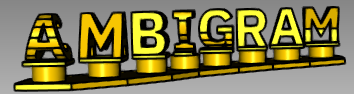

Ambigram is a small but powerful 3D library that automates the process of creating 3D Ambigrams from two different length strings and with the allowance of whitespaces, the Ambigram generation is customizable in the sense that it supports: font_size, letter_spacing, font_path, bases and letter_support.
sudo apt-get install python3 python3-pip python3-setuptoolspython3 -m pip install ambigrampip install git+https://github.com/sivefunc/ambigram.gitfrom ambigram import Ambigram
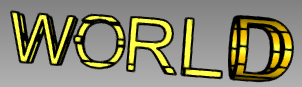
ambigram = Ambigram("HELLO", "WORLD", font_size=16)
ambigram.assembly.export('HelloWorld.stl')
#from cadquery.vis import show
#show(ambigram.assembly)| X Perspective | Y Perspective |
|---|---|
 |
 |
from ambigram import Ambigram

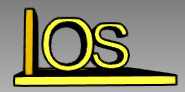
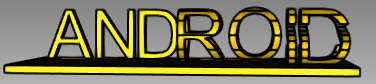
ambigram = Ambigram("ANDROID", "IOS", font_size=16)
ambigram = ambigram.add_base_rectangle(
    height=ambigram.font_size / 10.0,
    padding=ambigram.font_size / 10.0,
)

ambigram.assembly.export('AndroidIos.stl')
#from cadquery.vis import show
#show(ambigram.assembly)| X Perspective | Y Perspective |
|---|---|
 |
 |
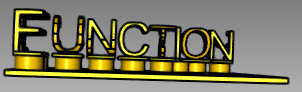
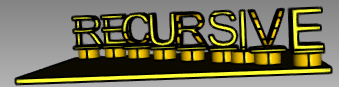
from ambigram import Ambigram

ambigram = Ambigram("RECURSIVE", "FUNCTION", font_size=16)

ambigram = ambigram.add_letter_support_to_all(
    cylinder_height=ambigram.font_size / 4.0,
    cylinder_radius=ambigram.font_size / 4.0,
    rect_height=ambigram.font_size / 16.0,
)

ambigram = ambigram.add_base_rectangle(
    height=ambigram.font_size / 10.0,
    padding=ambigram.font_size / 10.0,
)

ambigram.assembly.export('RecursiveFunction.stl')

#from cadquery.vis import show
#show(ambigram.assembly)| X Perspective | Y Perspective |
|---|---|
 |
 |
Use this base method when the Strings are from Equal Length or when one string length is multiple from other (e.g 5 and 15 because 15 is 5x3)
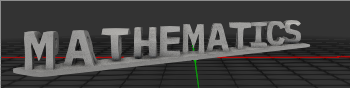
from ambigram import Ambigram

ambigram = Ambigram(
    "MATHEMATICS",
    "PROGRAMMING",
    font_size=16,

    # Path to your Font
    font_path="/usr/share/fonts/truetype/ibm-plex/IBMPlexMono-Bold.ttf",
)

ambigram = ambigram.add_base_rectangle_minimize(
    height=ambigram.font_size / 10.0,
    padding=0 # Padding is not supported for this function (YET)
)

ambigram.assembly.export('RectangleMinimize.stl')

#from cadquery.vis import show
#show(ambigram.assembly)| X Perspective | Y Perspective |
|---|---|
 |
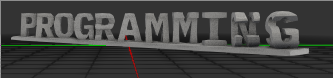 |
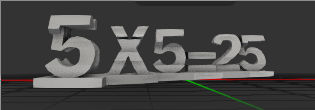
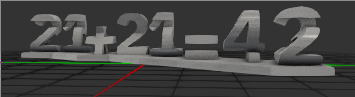
Use this method when a String Length is not a multiple from another (e,g 5 and 9) and you don't like the simple rectangle base, this makes the base by going point to point from one corner to another.
from ambigram import Ambigram

ambigram = Ambigram(
    "5X5=25",
    "21+21=42",
    font_size=16,

    # Path to your Font
    font_path="/usr/share/fonts/truetype/ibm-plex/IBMPlexMono-Bold.ttf",
)

ambigram = ambigram.add_base_p2p(
    height=ambigram.font_size / 10.0,
    padding=ambigram.font_size / 10.0,
)

ambigram.assembly.export('P2P.stl')

#from cadquery.vis import show
#show(ambigram.assembly)| X Perspective | Y Perspective |
|---|---|
 |
 |
- I recommend Monospaced fonts with Strong Serifs, because some letters like the letter 'I' in normal fonts is a thin thick and It doesn't looks appealing to the eye when compared to the other letters.
- Different Length String are implemented by placing the extra chars behind the shortest one (see it for yourself)
- Spaces are Allowed but needs further testing.
- A new algorithm for bases is need the current ones are rectangle, P2P and rectangle_minimize, the rectangle minimize is quite good when string lengths are equal but more improvement is needed.
- Needs further documentation
- Needs further testing
- 2CatTeam That allowed me to see that whitespaces and different string length are allowed.
- Lucandia That allowd me to see that It was possible in Python.