A modern, native GTK4/LibAdwaita wrapper for WhatsApp Web that provides seamless integration with the Linux desktop environment.
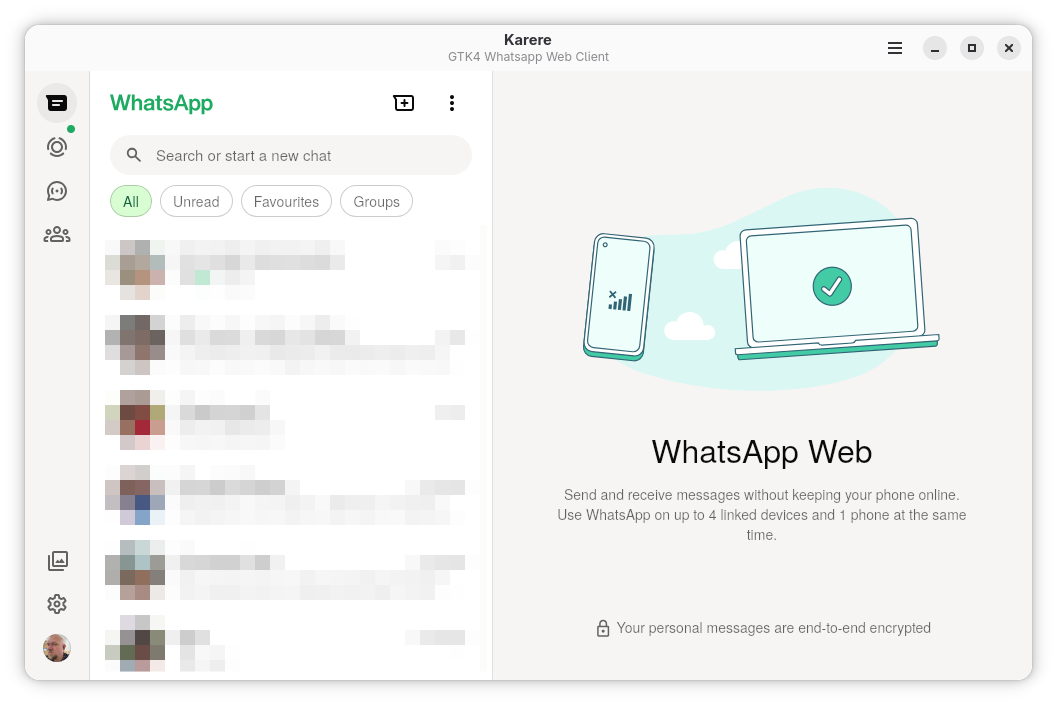
Karere 2.0.9 brings new icons and critical fixes for Flatpak environments.
- ✨ New Icons: Fresh new application icons (Thanks to @oiimrosabel).
- 🐛 Packaging Fix: Resolved startup crash on Flatpak (missing GSettings schema).
- 📝 Metadata: Fixed AppStream metadata for better store compliance.
For detailed release notes and version history, see CHANGELOG.md.
- Native Desktop Integration: True native notifications using GNotification with persistent permission state
- WhatsApp Web Integration: Full WhatsApp Web functionality with proper notification handling
- LibAdwaita Theming: Full support for Light, Dark, and System themes with native styling
- WebKitGTK Optimization: Efficient resource usage with persistent storage for cookies and sessions
- System Tray Icon: Dynamic icon showing unread status, with background run support
- Custom Notification Sounds: Select from 'WhatsApp', 'Pop', 'Alert', 'Soft', or 'Start' sounds
- Image & Text Paste: Seamless Ctrl+V support for both mixed content types
- Download Manager: Custom directory selection (e.g.,
~/Downloads) with toast notifications
- Screen Reader Optimization: Enabled Caret Browsing and ARIA labels
- Keyboard Navigation: Complete navigation with visible focus indicators
- High Contrast: Full support for Adwaita high contrast mode
- Reduced Motion: Respects system animation settings
- Zoom Control: Toggleable WebView zoom controls
- Auto-Correct: Smart text correction with dictionary support
- Multi-Language Support: 80+ dictionaries from LibreOffice
- Auto-Detection: Smart language detection based on system locale
- Dictionary Management: Override auto-detect to select specific languages
- Auto-Correct Toggle: Enable or disable automatic text replacement
- Granular Notification Controls: Master toggle, plus individual settings for sound, previews, and downloads
- Privacy Settings: Control message previews and system tray behavior
- Theme Selection: Light, Dark, or System preference
- Permission Management: Persistent controls for Microphone and Notifications
- Startup Control: Toggle automatic launch on login
flatpak install flathub io.github.tobagin.karere# Clone the repository
git clone https://github.com/tobagin/karere.git
cd karere
# Build and install development version
flatpak-builder --user --install --force-clean build packaging/io.github.tobagin.karere.Devel.yml
flatpak run io.github.tobagin.karere.DevelNote: After installation, you'll need to scan the QR code with your mobile WhatsApp to connect.
Launch Karere from your applications menu or run:
flatpak run io.github.tobagin.karereThe application will load WhatsApp Web and provide native desktop integration.
Access preferences through the application menu or keyboard shortcut (Ctrl+,) to configure:
- General: Theme selection, developer tools
- Accessibility: Keyboard shortcuts, focus indicators, high contrast, reduced motion, zoom settings, screen reader optimization
- Notifications: Native notification preferences, preview settings, background notifications
- Spell Checking: Multi-language spell checking with auto-detect
Ctrl+,- Open PreferencesCtrl+Q- Quit ApplicationF1- Show Keyboard Shortcuts Help
Ctrl++- Zoom InCtrl+-- Zoom OutCtrl+0- Reset Zoom
Ctrl+Shift+D- Open Developer ToolsCtrl+R- Reload Page
Ctrl+F- Find in ChatCtrl+Shift+F- Search Chats
Karere includes comprehensive accessibility support:
- Screen Reader Support: Full ARIA labels and semantic HTML
- Keyboard Navigation: Complete keyboard-only navigation with visible focus indicators
- High Contrast Mode: Automatic detection and adaptation
- Reduced Motion: Respects system reduce-motion preferences
- Configurable Shortcuts: All keyboard shortcuts can be enabled/disabled
- Focus Management: 82 focusable elements in a logical focus chain
Karere is built using modern GNOME technologies:
- Rust: Primary programming language for memory safety and performance
- GTK4: Modern toolkit with excellent Wayland support
- LibAdwaita: Native GNOME design language and components
- WebKitGTK 6.0: Efficient web rendering engine
- Blueprint: Declarative UI definition language
- Flatpak: Secure application distribution
Karere is designed with privacy in mind:
- Sandboxed: Runs in a Flatpak sandbox with minimal permissions
- Opt-in Telemetry: All logging and crash reporting is disabled by default
- Local Storage: Uses standard user data directories, no external services
- Transparent: Open source code available for audit
Due to compatibility limitations between WebKitGTK and WhatsApp Web, video attachments are currently not supported. This is a platform-level limitation that affects all WebKitGTK-based browsers (including GNOME Web/Epiphany).
What works:
- ✅ Text messages
- ✅ Image attachments
- ✅ Document attachments
- ✅ Audio messages
- ✅ Downloading videos sent by others
This limitation is being tracked and will be resolved if/when WebKitGTK adds better support for WhatsApp Web's video processing APIs.
There is a known issue with MPRIS and WebKit that causes a bug on Karere! See WebKit Bug 282000.
As a workaround you can disable MPRIS for the application of your interest.
To do this, create the file /etc/dbus-1/session.d/block-karere-mpris.conf with this content:
<busconfig>
  <policy context="mandatory">
    <deny own_prefix="org.mpris.MediaPlayer2.io.github.tobagin.karere"/>
  </policy>
</busconfig>
Note: This will block all instances of Karere from registering on MPRIS, because it uses the own_prefix prefix which also covers Sandboxed instances. It requires a system reboot or session restart to work.

Contributions are welcome! Please see CONTRIBUTING.md for guidelines on:
- Setting up your development environment
- Code style and conventions
- Testing and building
- Submitting pull requests
- Reporting bugs and feature requests
For questions or discussions, please use GitHub Discussions.
Karere is licensed under the GNU General Public License v3.0 or later. See LICENSE for the full license text.
- Discussions: Use GitHub Discussions for questions
- Issues: Use GitHub Issues for bugs and feature requests
- GNOME Project: For the excellent GTK4 and LibAdwaita frameworks
- WebKitGTK Team: For the efficient web rendering engine
- Rust Community: For the amazing language and tools
- WhatsApp Inc.: For WhatsApp Web
| Main Window | About Dialog |
|---|---|
 |
 |
| Preferences | Shortcuts |
|---|---|
 |
 |
Karere - Native WhatsApp Web client for Linux desktop environments.





