This project builds an automated, event-driven data pipeline that fetches news articles from a public API, stores the data in AWS S3 as Parquet files, and ingests it into Snowflake using Snowpipe. The entire pipeline is orchestrated and scheduled using Apache Airflow. The final data is structured into meaningful summary tables inside Snowflake.
- Python – for API integration and data cleaning
- AWS S3 – for raw Parquet file storage
- Snowflake – for data staging, storage, and transformation
- Snowpipe – for continuous, automated data ingestion
- Apache Airflow – for pipeline scheduling and orchestration
- NewsAPI – data source (news articles)
- Docker – deploy Airflow locally for testing and reproducibility

event-driven-snowflake-data-pipeline/
│
├── dags/
│ └── news_pipeline_airflow_dag.py
│
├── scripts/
│ └── fetch_news_etl_job.py
│ └── snowflake_commands.sql
│ └── requirements.txt
│
├── docs/
│ └── architecture_diagram.png
│ └── how_to_run.md
│ └── project_demo_video_link
│ └── airflow_dag_image.png
│ └── summary_news_table_output.png
│ └── author_activity_table_output.png
├── README.md
- Airflow triggers the DAG daily
fetch_news_etl_job.py:- Pulls news from the NewsAPI
- Cleans and formats the data
- Saves as a
.parquetfile - Uploads to AWS S3
- Snowpipe listens to S3 and ingests the Parquet file into Snowflake
- Airflow triggers SnowflakeOperator SQL tasks:
- Creates staging and final tables
- Populates summary tables (
summary_news,author_activity)
- Create a stage using S3
- Auto-create table using
INFER_SCHEMA - Load data using
COPY INTO - Create summary tables:
summary_news: article count per news sourceauthor_activity: article count per author
- ✅ Successfully ingested ~997 records into the raw news_data table from S3 throuh an external stage per run
- ✅ Generated 2 transformed tables:
- summary_news containing 80 records
- author_activity containing 113 records
- 🔁 DAG is scheduled to run daily
- 🧱 pipeline can be easily scaled to handle larger datasets (e.g., 50K+ records) with minimal config changes
The image below shows how the tasks are orchestrated in the Airflow DAG.

You can check the demo video by clicking on the image below:
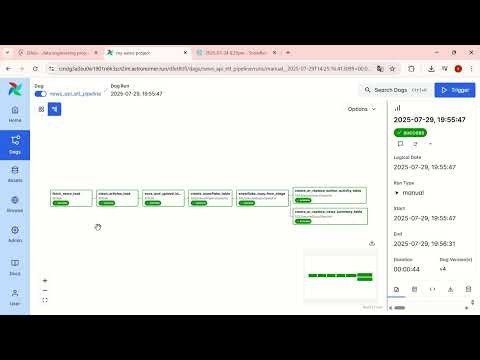
The following resources are available in the docs/ folder of this repository:
- Architecture Diagram – High-level visual of the data pipeline architecture
- Airflow_dag_image – Visual representation of the DAG execution flow
- how_to_run.md – Step-by-step instructions to set up and run this project locally
- project_demo_video_link – Link to the project demo video
You can open the
docs/folder to view all attached guides and visual assets.
For security reasons, this repository does not include any real credentials or sensitive information.
The following values have been masked, replaced, or removed in the shared scripts:
- NewsAPI Key
- AWS S3 Bucket Name
- AWS IAM Role ARN
- Snowflake Account & Connection Details
If you're running this project yourself, please replace these placeholders with your actual values. Refer to the HOW_TO_RUN.md file for guidance.
Varshith Chilagani
🔗 Linkedin Profile