This is a fork of the original MASShortcut project from cocoabits, which is now archived.
We love the framework, so we're keeping it alive here with minimal changes.
For simplicity, we removed all build systems other than Swift Package Manager. We also fixed a few warnings.
Thank you, cocoabits, for the amazing framework!
Please note: All the credit goes to cocoabits/Vadim Shpakovski and the original MASShortcut contributors. We're just fans of their work and want to keep it alive.
Some time ago Cocoa developers used a brilliant framework ShortcutRecorder for managing keyboard shortcuts in application preferences. However, it became incompatible with the new plugin architecture of Xcode 4.
The MASShortcut project introduces a modern API and user interface for recording, storing and using system-wide keyboard shortcuts.
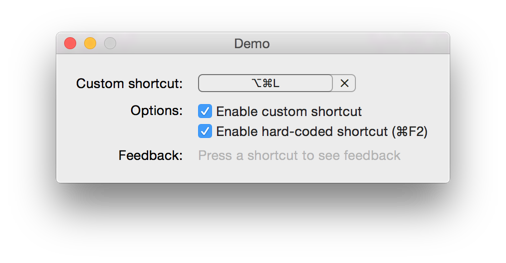
Features:
- Record and display keyboard shortcuts
- Watch for shortcuts and execute actions, system-wide
- Can be configured to be compatible with Shortcut Recorder
- Mac App Store friendly
- Works on OS X 10.11 and up
- Hacking-friendly codebase covered with tests
Partially done:
- Accessibility support. There’s some basic accessibility code, testers and feedback welcome.
- Localisation. The English and Czech localization should be complete, there’s basic support for German, French, Spanish, Italian, and Japanese. If you’re a native speaker in one of the mentioned languages, please test the localization and report issues or add missing strings.
Pull requests welcome :)
Swift Package Manager is the simplest way to install for Xcode projects. Simply add the following Package Dependency:
https://github.com/wegenerlabs/MASShortcut
I hope, it is really easy:
#import <Shortcut.h>

// Drop a custom view into XIB, set its class to MASShortcutView
// and its height to 19. If you select another appearance style,
// look up the correct height values in MASShortcutView.h.
@property (nonatomic, weak) IBOutlet MASShortcutView *shortcutView;

// Pick a preference key to store the shortcut between launches
static NSString *const kPreferenceGlobalShortcut = @"GlobalShortcut";

// Associate the shortcut view with user defaults
self.shortcutView.associatedUserDefaultsKey = kPreferenceGlobalShortcut;

// Associate the preference key with an action
[[MASShortcutBinder sharedBinder]
    bindShortcutWithDefaultsKey:kPreferenceGlobalShortcut
    toAction:^{
    // Let me know if you find a better or a more convenient API.
}];
When you have installed via a method other than Swift Package Manager, then the import is slightly different:
#import <MASShortcut/Shortcut.h>You can see a real usage example in the Demo target. Enjoy!
By default, MASShortcut uses a different User Defaults storage format incompatible with Shortcut Recorder. But it’s easily possible to change that, so that you can replace Shortcut Recorder with MASShortcut without having to migrate the shortcuts previously stored by your apps. There are two parts of the story:
If you bind the recorder control (MASShortcutView) to User defaults, set the Value Transformer field in the Interface Builder to MASDictionaryTransformer. This makes sure the shortcuts are written in the Shortcut Recorder format.
If you use MASShortcutBinder to automatically load shortcuts from User Defaults, set the bindingOptions accordingly:
[[MASShortcutBinder sharedBinder] setBindingOptions:@{NSValueTransformerNameBindingOption:MASDictionaryTransformerName}];This makes sure that the shortcuts in the Shortcut Recorder format are loaded correctly.
By registering for KVO notifications from NSUserDefaultsController, you can get a callback whenever a user changes the shortcut, allowing you to perform any UI updates, or other code handling tasks.
This is just as easy to implement:
// Declare an ivar for key path in the user defaults controller
NSString *_observableKeyPath;

// Make a global context reference
void *kGlobalShortcutContext = &kGlobalShortcutContext;

// Implement when loading view
_observableKeyPath = [@"values." stringByAppendingString:kPreferenceGlobalShortcut];
[[NSUserDefaultsController sharedUserDefaultsController] addObserver:self forKeyPath:_observableKeyPath
                                                             options:NSKeyValueObservingOptionInitial
                                                             context:kGlobalShortcutContext];

// Capture the KVO change and do something
- (void)observeValueForKeyPath:(NSString *)keyPath ofObject:(id)obj
                        change:(NSDictionary *)change context:(void *)ctx
{
    if (ctx == kGlobalShortcutContext) {
        NSLog(@"Shortcut has changed");
    }
    else {
        [super observeValueForKeyPath:keyPath ofObject:obj change:change context:ctx];
    }
}

// Do not forget to remove the observer
[[NSUserDefaultsController sharedUserDefaultsController] removeObserver:self
                                                             forKeyPath:_observableKeyPath
context:kGlobalShortcutContext];Swift Package Manager is the simplest way to import MASShortcut, just import the Module like so:
import MASShortcut
MASShortcut is licensed under the 2-clause BSD license.